We’ve tested 31 standing desks over 4 years of remote work. Here’s what actually matters when choosing between manual, electric, and converter options — and why most people’s height calculations are completely wrong.
The Standing Desk Reality Check
Uncomfortable Truth #1: Most people use their standing desk in sitting mode 80-90% of the time.
Uncomfortable Truth #2: A wobbly standing desk will make you hate standing and typing simultaneously.
Uncomfortable Truth #3: The “ideal” height range calculators online are mostly useless for real-world setups.
Standing desks aren’t magic productivity boosters. They’re tools for reducing the health impacts of prolonged sitting. Set your expectations accordingly.
The Four Types: Understanding Your Options
Desktop Converters: The Gateway Option
How They Work: Units that sit on top of your existing desk and raise/lower your monitor and keyboard.
Pros:
- Keep your existing desk
- Much cheaper than full standing desks ($100-300)
- Easy to install and remove
- Good for testing if you like standing while working
- Some models offer separate keyboard/monitor height adjustment
Cons:
- Take up significant desk surface space
- Often less stable than full standing desks
- Weight capacity limitations (usually 20-35 lbs)
- Can look cluttered and industrial
- Keyboard tray often too narrow
Best For: Renters, people unsure about standing desks, existing desks you love
Examples: Flexispot Standing Desk Converter, Varidesk models
Manual Crank Desks: The Budget-Friendly Choice
How They Work: Hand crank adjusts desk height via mechanical gear system.
Pros:
- Significantly cheaper than electric options
- No electrical components to fail
- Usually very stable (solid mechanical connections)
- Unlimited positions within range
- No power consumption
Cons:
- Tedious to adjust (30+ seconds of cranking)
- Difficult to adjust with items on desk
- Limited weight capacity (usually 50-100 lbs)
- You’ll stop adjusting it regularly due to inconvenience
Best For: Light computer use, infrequent height changes, budget-conscious buyers
Reality Check: Manual desks sound appealing until you try to adjust them with a monitor, laptop, and coffee cup on the surface.
Single-Motor Electric: The Compromise Option
How They Work: One motor powers height adjustment via gear or belt system.
Pros:
- Much more convenient than manual options
- Reasonable pricing ($200-500)
- Adequate stability for most setups
- Memory presets available on many models
Cons:
- Slower height adjustment (45-60 seconds full range)
- Less stable than dual-motor systems under load
- Single point of failure for motor
- Weight capacity typically 100-150 lbs
Best For: Light to moderate computer setups, budget-conscious buyers who want electric convenience
Dual-Motor Electric: The Premium Choice
How They Work: Two motors (one per leg) provide independent power to each side of the desk.
Pros:
- Fastest height adjustment (15-30 seconds full range)
- Excellent stability and weight capacity (150-300+ lbs)
- Even weight distribution prevents wobbling
- Premium models offer collision detection and memory presets
- Can handle heavy monitor arms and equipment
Cons:
- Most expensive option ($400-1500+)
- More complex electronics (more potential failure points)
- Higher power consumption
- Overkill for simple laptop setups
Best For: Heavy equipment loads, frequent height changes, professional home offices
Height Range: Getting the Math Right
Standard advice tells you to measure your elbow height and add monitor height. That’s wrong for most people.
Realistic Height Requirements:
For Average Adults (5'4" to 6'2"):
- Sitting Height: 28-30 inches
- Standing Height: 42-48 inches
- Full Range Needed: 22-24 inches of adjustment
For Short Adults (Under 5'4"):
- Sitting Height: 26-28 inches
- Standing Height: 38-42 inches
- Watch Out For: Many desks don’t go low enough
For Tall Adults (Over 6'2"):
- Sitting Height: 30-32 inches
- Standing Height: 48-52+ inches
- Watch Out For: Maximum height limitations
Common Height Range Mistakes:
“I’m 5'10” so We need 29" sitting and 43" standing"
- Ignores shoe height, monitor thickness, keyboard height
- Doesn’t account for anti-fatigue mats (add 1-2 inches)
- Assumes perfect posture (most people slouch slightly)
Better Approach:
- Measure your current comfortable sitting desk height
- Stand up and measure comfortable typing height
- Add 2-3 inches buffer on both ends
- Choose desk with range that exceeds your measurements
Motor Types and Mechanisms: What Actually Lasts
Belt-Drive Systems:
- Pros: Quieter operation, smoother movement
- Cons: Belts can stretch or snap over time
- Longevity: 3-5 years typical, 7+ years for quality units
Chain-Drive Systems:
- Pros: More durable than belts, handles heavy loads well
- Cons: Slightly noisier, requires occasional lubrication
- Longevity: 5-8 years typical, 10+ years for quality units
Direct-Drive Systems:
- Pros: Fewest moving parts, most reliable
- Cons: More expensive, limited availability
- Longevity: 8-12+ years typical
Telescoping Column Design:
Look for desks with multiple telescoping segments (3+ sections) rather than single-column designs. More segments = better stability and higher weight capacity.
Stability: The Make-or-Break Factor
A wobbly standing desk will make you abandon standing work permanently. Here’s what creates stability:
Frame Design Factors:
T-Shaped vs C-Shaped Legs:
- T-shaped: Better front-to-back stability
- C-shaped: Better side-to-side stability, easier chair access
- Winner: Depends on your setup, but T-shaped generally preferred
Crossbar Support:
- Essential for stability on desks 60" or wider
- Should be removable for chair access
- Adds significant rigidity to the frame
Frame Weight:
- Heavier frames = more stability
- Look for frames over 60 lbs for serious stability
- Lightweight frames (<40 lbs) tend to wobble under load
Desktop Material Impact:
- Solid Wood: Heaviest and most stable, dampens vibrations
- Engineered Wood: Good stability-to-cost ratio
- Laminate Over Particle Board: Adequate for light use
- Glass: Looks great but amplifies vibrations (avoid for standing use)
Weight Capacity vs. Real-World Use
Manufacturers rate weight capacity under ideal conditions. Real-world capacity is typically 60-70% of the advertised number.
Typical Setup Weights:
- Minimal Setup: Laptop + accessories = 10-15 lbs
- Standard Setup: Monitor + laptop + peripherals = 25-35 lbs
- Heavy Setup: Multiple monitors + equipment = 50-75 lbs
- Enthusiast Setup: Ultra-wide monitors + arms + equipment = 80-120+ lbs
Capacity Guidelines:
- 50-100 lb capacity: Light laptop use only
- 100-150 lb capacity: Standard office setups
- 150-200 lb capacity: Heavy monitor setups, multiple displays
- 200+ lb capacity: Professional equipment, multiple large monitors
Pro Tip: Buy 50% more capacity than you think you need. Weight capacity and stability are closely related.
Desktop Size and Shape Considerations
Width Guidelines:
- 48" Width: Adequate for single monitor + laptop
- 60" Width: Comfortable for dual monitors or ultra-wide
- 72" Width: Spacious for multiple monitors + equipment
- 80"+ Width: Requires crossbar support, consider room proportions
Depth Guidelines:
- 24" Depth: Minimum for monitor + keyboard
- 30" Depth: Comfortable for most setups
- 36" Depth: Ideal for monitor arms and equipment
Shape Considerations:
- Rectangular: Most versatile, best space utilization
- L-Shaped: Good for corner installations, more expensive
- Curved: Aesthetic preference, no functional advantage
Cable Management: The Overlooked Essential
Standing desks create unique cable management challenges as cables must accommodate height changes.
Essential Cable Management Features:
- Cable trays: Keep cables organized and off the floor
- Wire grommets: Clean cable pass-through points
- J-clips or adhesive holders: Secure cables to desk edge
- Spiral cable wrap: Protects cables during height changes
Common Cable Management Mistakes:
- Cables too short for full height range
- Heavy adapters pulling on cables during movement
- Power strips dangling unsupported
- Not planning cable routing before setup
Budget Tiers and Value Sweet Spots
Budget Range ($100-300): Testing the Waters
- Desktop converters and basic manual desks
- Single motor electric options
- Good For: Experimenting with standing work
- Limitations: Stability and convenience compromises
Mid-Range ($300-700): The Sweet Spot
- Quality single motor or entry dual motor systems
- Good stability and weight capacity
- Memory presets and collision detection
- Best Value: Most people’s needs met here
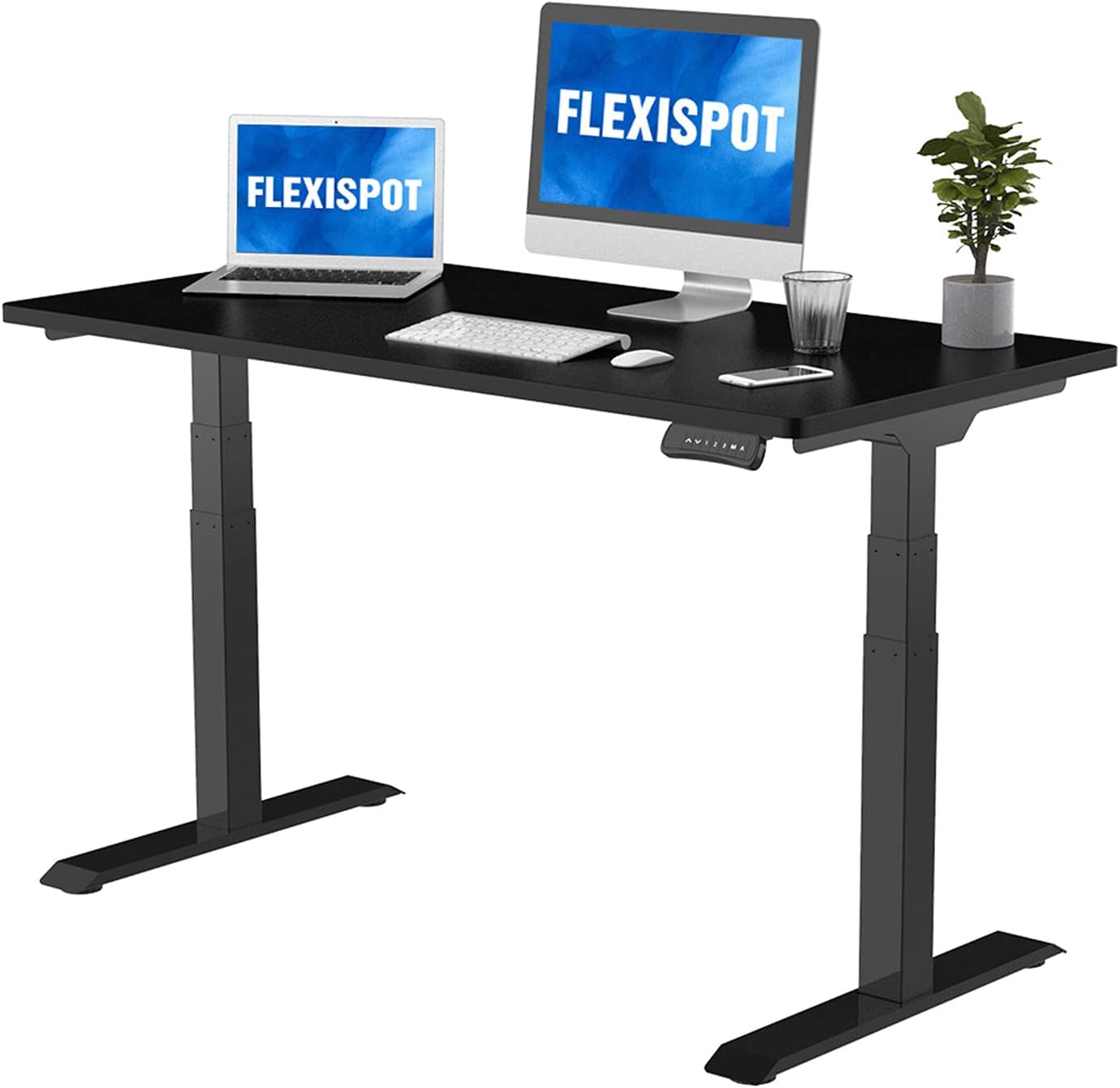
- Examples: UPLIFT V2, Jarvis, many Flexispot models
Premium Range ($700-1500): Professional Grade
- Robust dual motor systems
- Excellent stability and weight capacity
- Premium materials and build quality
- Best For: Heavy equipment, daily use, long-term investment
Luxury Range ($1500+): Diminishing Returns
- Designer aesthetics and premium materials
- Marginal performance improvements over mid-range
- Best For: Executive offices, aesthetic preferences
Anti-Fatigue Mats: The Critical Accessory
Standing on hard floors causes fatigue, knee pain, and circulation issues. Anti-fatigue mats are not optional accessories.
Mat Characteristics to Look For:
- Thickness: 3/4" to 1" optimal (too thin = ineffective, too thick = unstable)
- Firmness: Medium density foam or gel
- Size: Large enough for natural movement (20"x32" minimum)
- Edge design: Beveled edges prevent tripping
- Surface texture: Non-slip top and bottom
Common Anti-Fatigue Mat Mistakes:
- Buying mats too small (restricts natural movement)
- Choosing decorative mats over functional ones
- Not factoring mat height into desk height calculations
- Buying extremely cheap mats that compress quickly
What Reddit Actually Recommends
Based on r/StandingDesk, r/HomeOffice, and r/ergonomics:
Most Recommended Overall: UPLIFT V2 series (reliability and customer service) Best Budget Pick: Flexispot basic dual motor models Best Premium Choice: Jarvis or Herman Miller options Most Regretted: Cheap Amazon knockoffs, overly complex “smart” desks Sleeper Hit: Used commercial standing desks (if you can find them)
Reddit’s Hard-Learned Lessons:
- “Buy once, cry once” — cheap desks are expensive in the long run
- Stability matters more than any other feature
- Height range is personal — measure yourself, don’t trust calculators
- Cable management planning prevents major headaches
- Anti-fatigue mats are not optional
Quick Decision Framework
If you’re unsure about standing desks: Start with a quality desktop converter
If you have a heavy monitor setup: Dual motor system with 200+ lb capacity
If you adjust height frequently: Electric over manual, dual motor over single
If you’re on a tight budget: Quality manual crank over cheap electric
If stability is critical: Prioritize frame weight and T-shaped legs
If you have limited space: Consider compact models but don’t compromise on stability
If you’re tall (6’+) or short (5'4"-): Verify height range carefully before purchasing
Common First-Time Buyer Mistakes
- Underestimating space requirements: Measure your room and factor in height adjustment
- Ignoring weight capacity: Your setup is heavier than you think
- Buying based on price alone: Cheap standing desks make you hate standing
- Not planning cable management: Afterthought cable management looks terrible
- Forgetting about anti-fatigue mats: Standing on hard floors defeats the purpose
- Not testing height ranges: Online calculators don’t account for your specific setup
Setup and Transition Tips
Initial Setup Strategy:
- Start with 15-20 minute standing intervals
- Gradually increase standing time over 2-3 weeks
- Listen to your body — foot/back pain means adjust or take breaks
- Use timer reminders to alternate sitting/standing
Ergonomic Considerations:
- Monitor top should be at eye level (both sitting and standing)
- Keyboard height should allow 90-degree elbow angles
- Consider footrails for weight shifting while standing
- Proper lighting reduces eye strain and improves posture
FAQ
Q: How often should I alternate between sitting and standing? A: Every 30-60 minutes initially, working up to 50/50 or 60/40 sit/stand ratio. Listen to your body.
Q: Are standing desks worth it for short people? A: Yes, but height range is critical. Many desks don’t go low enough. Measure carefully and consider desktop converters.
Q: Can I put a standing desk on carpet? A: Yes, but stability may be reduced. Consider furniture pads or a hard surface under the legs for heavy desks.
Q: How long do electric standing desks last? A: 5-10 years for quality models with moderate use. Motors typically fail before frames.
Q: Should I get memory presets? A: Very helpful if multiple people use the desk or you have specific preferred heights for different activities.
Bottom Line
Choose stability over features, and buy more weight capacity than you think you need. A rock-solid $500 desk beats a wobbly $300 desk every time.
Most people are happiest with dual-motor electric desks in the $400-700 range from established manufacturers. These offer the best balance of stability, convenience, and longevity without premium pricing.
Start with shorter standing intervals and gradually build tolerance. The goal isn’t to stand all day — it’s to reduce prolonged sitting and give yourself the option to change positions when your body needs it.
For specific model recommendations, check our detailed review of the Flexispot Standing Desk Converter or browse our complete guide to the best standing desks for home office.